

Built to move fundraising forward: What’s new on GoFundMe Pro

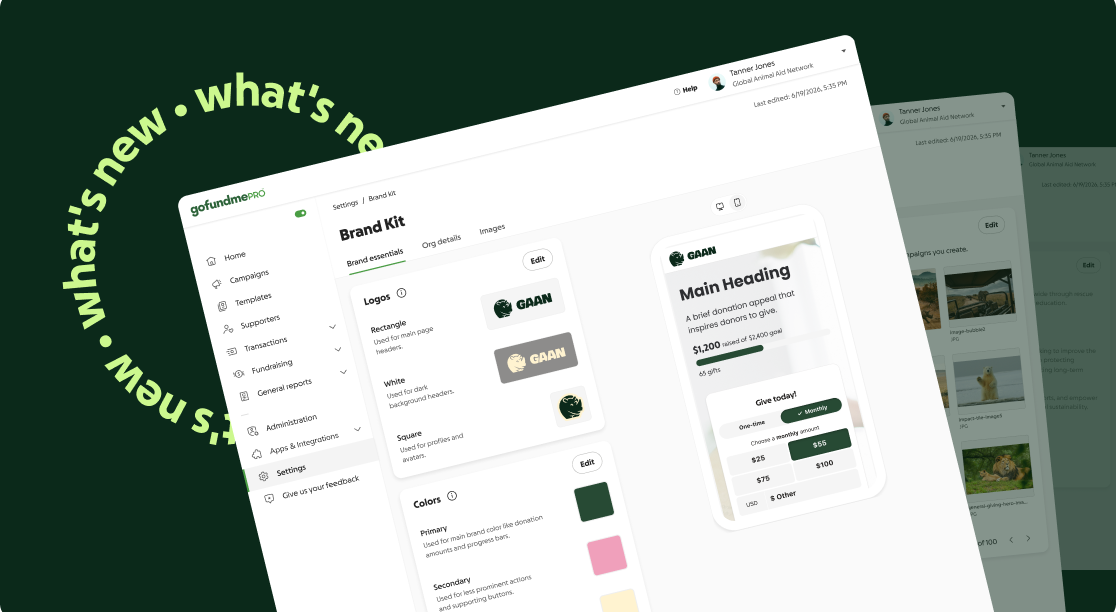
The first half of 2026 was all about helping nonprofits raise more, reach more supporters, and work more efficiently by spending less time on manual work.
From AI-powered giving and faster checkout to smarter campaign management, peer-to-peer fundraising, and events, we shipped more than 40 updates shaped by the nonprofits we serve.
These updates are part of how GoFundMe Pro delivers more value over time. We continually listen to nonprofits, learn from our community of more than 200 million, and improve our experiences—helping organizations build on their initial gains long after they start on our platform. Over three years, organizations on GoFundMe Pro have seen their gross donation volume grow by 100%.*
There’s a lot to explore, so we’ve organized the latest updates around what you want to accomplish.
*Based on an internal GoFundMe Pro analysis. Results vary based on factors like organization size, category, and engagement with the platform.
Raise more money
Small improvements at key moments can have a big impact on fundraising. These updates reduce friction, personalize the giving experience, and help more donors complete their gifts.
Boost donation intent
1. Personalized Intelligent Ask Amounts around campaign goals
When we introduced Intelligent Ask Amounts, the idea was simple: donors don’t all give the same way. Their giving capacity, behavior, and preferences vary, so we built a way to personalize ask amounts for each donor.
Now, we’re adding a new layer, one that gives you more control. With goal-setting functionality, nonprofits can tailor Intelligent Ask Amounts recommendations to better support each campaign’s objectives.

Now, nonprofits can choose from three goals:
- Optimize for total revenue
- Optimize for conversion rate
- Balance revenue and conversion
From there, the GoFundMe Intelligence engine adapts the giving experience in real time, serving personalized ask amounts that align with your objectives and your donors’ behavior.
The results speak for themselves: campaigns optimized for total revenue have generated up to 7% more revenue than those using a standard default ask array, whereas campaigns optimized for monthly gifts have seen up to 5% higher recurring conversion.
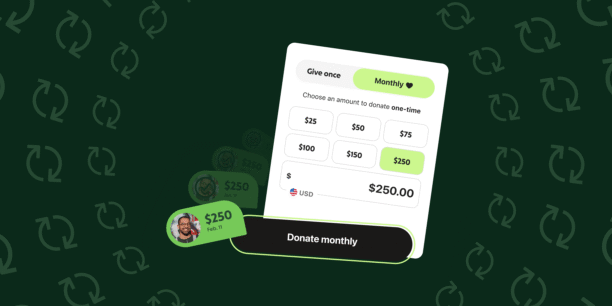
2. Optimized the donation grid to help donors find the right gift size
We also released a cleaner donation grid, backed by research into what motivates donors to give.
The updated design moves from a four-tile ask array to a six-tile grid, giving donors more suggested amount options. One-time and monthly giving options are now unified in the same experience, monthly giving is highlighted with a heart icon, and six suggested amounts help more donors find a gift size that feels right for them.
We also simplified currency selection. The old page-level currency picker is gone in favor of an in-grid toggle that only appears when a donor’s currency differs from the fundraiser’s.

3. Made program designations easier for donors to discover
Donors often want to give to the fund that reflects what matters to them. If they can’t find it, they may leave before giving.
Program designations are now surfaced directly on the donation grid, and built-in search makes it easier to find the right designation. For Giving Cart-enabled campaigns, donors can give to multiple designations at once.

4. Helped donors support more causes in one step with Giving Cart
Since its 2024 launch, Giving Cart has helped donors support multiple funds, campaigns, or designations in a single transaction. With more than $190 million raised through the experience, nonprofits that offer it see 2x higher average gift amounts.*
This year, we put those insights into action with a refreshed design and more seamless multidesignation giving. Donors can now search for and select multiple funds in one checkout, edit gift amounts and frequencies in-line, and see their totals update automatically.
Giving Cart is now included with every GoFundMe Pro plan, with no upgrade required, along with new campaign templates built around proven best practices.
*Based on aggregated data from nonprofits using Giving Cart. Results may vary.
5. Built giving momentum with real-time social proof
Donor names and gift amounts now animate in real time on the donation grid, creating momentum where it matters most. We also refreshed the activity feed with richer animations and a built-in donate button, making it even easier for supporters to join in the moment they see others giving.

6. Increased mobile checkout starts with a persistent donate button
The mobile screen has limited real estate to show compelling campaign content and the call to action to donate. We released a “sticky” donate button that stays on screen even when a potential donor scrolls through the donation page. A/B testing showed it increased checkout starts by more than 5%.
7. Created urgency with a customizable countdown timer
Build urgency into your campaign with a customizable countdown timer that can count down to preset events or your own start and end time.

8. Expanded payment options with DAFpay
Donor-advised funds (DAFs) are one of the fastest-growing sources of charitable giving. Through an integration with Chariot, GoFundMe Pro customers can now request DAFpay to accept DAF gifts directly in campaign checkout.
Learn more in this support article.
Enable frictionless checkout
Every extra click creates friction in the checkout process. This half, we streamlined key parts of the donation experience to reduce drop-off, increase conversions, and help more donors complete their gifts with confidence.
9. Converted more one-time donors into recurring supporters with intelligent nudges
A well-timed ask can build long-term support. A poorly timed one can cause first-time donors to abandon their gift.
GoFundMe Pro uses machine learning models to predict which first-time donors should see a gentle nudge toward monthly giving, and how much to suggest. In testing, this approach drove a double-digit lift in recurring gifts with minimal impact on one-time conversion.

10. Helped donors check out faster with their preferred payment method
Campaign Studio checkout now leads with express payment options like Apple Pay, enabling supporters who are ready to complete their gift in a tap, whereas donors who prefer a guided flow still have that option.
In testing, this lifted conversion 1.3% and cut time to donate by 8.5%.
11. Kept donors connected to their dedication throughout checkout
A donor’s “in honor of” dedication now carries through the entire checkout flow in your organization’s brand colors. This keeps donors connected to the intent that brought them there in the first place.
12. Fueled ongoing stewardship with frictionless marketing consent
Getting a donation is great. Being able to reach that donor again is even better.
This feature captures email and SMS opt-ins directly in checkout, with no extra steps or a separate form. You control the trade-off: use text-only consent for a faster checkout or built-in linked terms for stronger compliance support.
13. Reduced checkout friction with ZIP-only billing
Too many checkout fields can slow donors down, especially younger, mobile-first supporters used to a fast checkout in other apps.
Nonprofits can now collect only a ZIP code at checkout instead of a full address, helping reduce form friction and increase completion rates for credit card and ACH gifts.
Work more efficiently
Work faster with clearer data, reusable campaign templates, and fewer manual workarounds. New reporting, receipt, and self-serve updates help teams spend less time reconciling information and more time acting on it.
Save time across campaigns and operations
14. Made it easier to maintain brand consistency across campaigns
Consistent branding helps nonprofits build long-term donor trust, but keeping the same look and feel across dozens, or even hundreds, of campaigns can take hours of manual updates.
Our brand kit makes that work simpler and more scalable. Manage your colors, logos, fonts, buttons, and mission statement in one place, then apply those settings to every new campaign your team builds.

15. Created better donation experiences across every screen
Donors give from different devices, and desktop-first pages don’t always work well on smaller screens.
GoFundMe Pro now lets you design campaign pages separately for mobile and desktop. Rearrange sections, adjust text, and hide elements by device so each page is easier to view and use on any screen.
16. Sped up finding the right image for every campaign
With our image library, you can store your brand visuals in one place and access them directly from the campaign builder. You can also choose from a curated, searchable stock image collection, making it easier to find visuals that fit each campaign.
17. Brought easier image editing into the campaign builder
Instead of uploading an image and hoping it fits, you can fine-tune it directly in the campaign builder. Crop, reposition, and set mobile focal points so your images highlight what matters most on every screen.
18. Simplified campaign messaging with on-brand AI suggestions
GoFundMe Intelligence uses your mission, campaign goals, and brand kit to suggest copy tailored to your organization. Keep what works, edit what doesn’t, and publish with more confidence.
19. Gave nonprofits more control over campaign publishing
Set a date and time for a new campaign or updates to a live one, and GoFundMe Pro will publish them automatically. Prepare everything in advance, launch with confidence, and spend less time watching the clock.
20. Improved campaign discoverability
When your page title and meta description aren’t set, search engines and social media platforms may pull in details that don’t accurately reflect your campaign.
GoFundMe Pro campaign settings give you more control over how your campaign appears across search and social media. You can manage titles, descriptions, URLs, and social media previews in one place, helping each campaign show up with accurate, more compelling information.
21. Helped teams repeat what works with reusable campaign templates
Your organization likely has years of data on which campaign templates performed best. Now, you can turn those proven templates into a shared library your whole organization can use.
Save what works, share it across teams, and give every campaign a stronger starting point.

22. Brought GoFundMe fundraising data directly into Pro Manager
Your GoFundMe fundraising data is now available in Pro, with no exports required.
Two new reports on the GoFundMe Channel page bring donations and fundraiser activity into one place. They now include full historical backfill and non-Stripe payment types, such as DAF and PayPal Giving Fund gifts, previously not visible in Pro.
23. Brought fundraiser activity into event attendee reporting
If your events include peer-to-peer fundraising, the Attendees report in GoFundMe Pro can now display the fundraising page, team captain, and transaction data alongside attendee information.
24. Gave donors self-serve access to tax summaries
Donors can now get their own tax summaries whenever they need them, without emailing your team.
25. Enabled teams to send receipts for offline donations
Send receipts for offline donations right from GoFundMe Pro, saving time and ensuring donors get proof for their records without a manual workaround.
Connect your systems with stronger integrations
A lot of this half’s work happened under the hood, in the connections that keep your systems in sync.
26. Delivered Webhooks for near real-time updates to connected systems
Webhooks now deliver near real-time updates to external systems when donation or supporter activity happens in GoFundMe Pro. Transaction, supporter, and recurring plan events arrive in seconds, helping teams reduce the need for constant polling.
27. Improved data sync reliability in Salesforce Agentforce Nonprofit (AFNP)
We improved the Agentforce Nonprofit integration infrastructure to make GoFundMe Pro data in Salesforce more accurate, complete, and dependable.
Stronger validation, more reliable syncing, and better error visibility and recovery help teams work from trusted data with less manual reconciliation or support intervention.
28. Brought $0 transactions and dedications into Salesforce Agentforce Nonprofit
Dedication updates now sync automatically, keeping Gift Tribute records current whenever a donor or admin makes a change in AFNP or NPSP. $0 transactions—including free and discounted registrations—sync too, giving you a complete view of engagement and a cleaner implementation.
29. Expanded recurring donation sync for Salesforce
GoFundMe Pro now syncs all recurring donation plan statuses to Agentforce Nonprofit, including active, paused, canceled, failed, and completed. For organizations using NPSP, support for paused donation fields helps ensure recurring gifts are reflected accurately with fewer manual updates.
Reach more supporters
From automated fundraiser creation to richer reporting and customization, these updates help more people confidently fundraise on your behalf.
Scale your peer-to-peer fundraising
Peer-to-peer only works when your supporters feel confident starting a fundraiser. These updates make that easier and give you more visibility into who’s fundraising and why, with GoFundMe peer-to-peer.
30. Faster, more on-brand campaign creation
With Studio in GoFundMe Pro, your team can quickly create engaging, personalized peer-to-peer campaigns. Prebuilt templates simplify setup and keep every campaign consistent with your brand while giving supporters the flexibility to tell their stories in their own way.
Easily configure registration windows, campaign and fundraiser goals, and fundraiser defaults. You can also inspire friendly competition with leaderboards and activity feeds, and enable smart goals and activity tracking for GoFundMe fundraisers, all with less operational lift for your team.
31. Made it easier for fundraisers to kick-start their campaigns
Supporters starting a GoFundMe peer-to-peer fundraiser can now choose a fundraising moment—like a birthday, tribute, challenge, or wedding—to kick-start their experience. Based on their selection and your organization’s mission, GoFundMe auto-generates a starting point for their title and fundraiser story, making it easier for supporters to launch with confidence.
The selected moment and response are also captured in GoFundMe Pro, giving your team more context about each fundraiser. You can even customize your campaign with branded fundraising moments, creating a more tailored experience for supporters.

32. Gave every fundraiser a more relevant starting point
Instead of sending every supporter to the same generic start-fundraiser page, nonprofits can now customize that experience with their own title, subtext, imagery, and social proof.
This gives you more flexibility to tailor the first few fundraiser setup steps around your goals, whether you’re promoting fundraising incentives, supporting an event-specific campaign, or engaging supporters who arrive from paid ads.

33. Helped fundraisers tell more compelling personal stories
Story builder helps supporters get started with a simple prompt: “I’m fundraising because … ” GoFundMe turns their one- or two-sentence response into a full story with a title and image, which they can edit before publishing.

34. Kept fundraiser momentum going with seamless activity tracking
Donors who are motivated by a challenge need an easy way to track and share their progress. Whether they’re walking, running, cycling, swimming, or taking on another activity, they can now connect their GoFundMe account with Strava to automatically update their fundraiser page as they move toward their challenge goal.

35. Coached fundraisers toward reaching their goals
GoFundMe’s coaching tool gives fundraisers timely guidance, including when and where to share their page, how to thank and update supporters, and which actions can help improve their chances of success.
36. Drove more peer-to-peer donations with timely nudges
Contextual leaderboard nudges show donors how their gift can help a friend or family member climb the rankings, adding timely motivation at the moment of giving. In experiments, these nudges increased one-time conversions by 14% and recurring conversions by 38%.

37. Helped nonprofits learn more about fundraisers with custom questions
Peer-to-peer fundraisers are some of your most passionate supporters. Learning more about them can help you tailor outreach, support, and incentives.
Custom questions in GoFundMe peer-to-peer campaign setup help you collect key details from the start, so you can build stronger fundraiser relationships and support each participant more effectively.
Deliver smoother events and ticketing
Create a smoother event experience from setup to checkout. New ticketing updates help reduce manual work, tailor communications, and make it easier for attendees to complete their registration.
38. Gave nonprofits more control over donations across event pages and checkout
Donations collected during ticket checkout and donations collected on the donation page now have their own independent settings. Turn either on or off without affecting the other.
39. Sped up ticket checkout with attendee autofill
Purchasers registering multiple attendees can now fill in billing details faster. Instead of retyping a name and email they previously entered for an attendee, they can choose that attendee from a dropdown to autofill their billing information.
They can also enter billing details manually if they prefer.
40. Simplified assigning custom questions across multiple ticket types
You can now assign a custom question to multiple ticket types at once. Select each ticket type that should include the question, save your changes, and the question will only appear at checkout for those ticket types.
41. Added a company card option to simplify ticket checkout
Attendees can now indicate when they’re paying with a company card at checkout. The company name will appear on their receipt for recordkeeping.
This is a dedicated setting, separate from the donation page toggle.
42. Simplified event communications with emails by ticket type
Target event emails by ticket type with no manual filtering required. Send the right message to the right attendees based on their registration.
Staying in the loop
This year, we also launched a dedicated home for product updates in GoFundMe Pro Academy.
Whether you’re exploring GoFundMe Pro or already using it, you can find a curated timeline of what changed, why it matters, and how these updates reflect the needs and feedback we hear from nonprofit teams.
What’s ahead in the second half
Everything we’re building is designed to help your team spend less time managing fundraising technology and more time advancing your mission.
In the second half of the year, that means deeper AI-guided coaching for organizers, more ways to grow recurring revenue, broader Giving Cart and program designation capabilities, and continued investment in Studio.
For nonprofits that have already moved to Studio, the results show a meaningful lift. A recent analysis found that Studio users grew more than 7% faster during the giving season than nonprofits using legacy donation pages, with the gains continuing through year-end and beyond.
Thank you for the feedback that keeps us focused on what matters most to your organizations. We look forward to building the next chapter together.
Subscribe to the GoFundMe Pro blog
Get the latest fundraising tips, trends, and ideas in your inbox.
Thank you for subscribing
You signed up for emails from GoFundMe Pro

Request a demo
Learn how top nonprofits use GoFundMe Pro to power their fundraising.