

The complete guide to LinkedIn for nonprofits: Fundraising, networking, and growth strategies


Growing support for your mission starts with reaching the right people at the right time—whether driving donations, boosting community engagement, or building long-term supporter relationships. Strong content marketing helps your nonprofit connect with audiences in meaningful ways across today’s digital-first landscape.
The key is knowing where to focus your efforts and how to turn interest into lasting action. For many nonprofits, LinkedIn has become an invaluable tool to expand reach, build brands, and increase donations.
In this guide, we’ll cover everything you need to know about LinkedIn for nonprofits to scale awareness for your mission, improve your fundraising, and activate engaged networks of supporters.
Why LinkedIn matters for nonprofits
Since launching in 2003, LinkedIn has focused on helping people build professional connections, making it a valuable platform for nonprofits looking to engage corporate partners, donors, volunteers, and prospective hires. Today, 2.2 million nonprofits use LinkedIn to grow awareness and strengthen their networks.
Even as new social media platforms emerge, LinkedIn continues to stand out for its scale and professional focus. With more than 1.3 billion members across 200+ countries, the platform gives nonprofits powerful opportunities to expand visibility, support fundraising goals, and build long-term relationships that advance their mission.
Approximately 40% of high-net-worth individuals in the U.S. who use social channels turn to LinkedIn for updates, information, and advice, and 62% access it weekly. LinkedIn audiences are often highly engaged and mission-aligned, making the platform especially effective for nonprofit fundraising, corporate partnerships, and thought leadership.
So how can your organization make the most of LinkedIn for fundraising and engagement?
1. Build a credible nonprofit profile
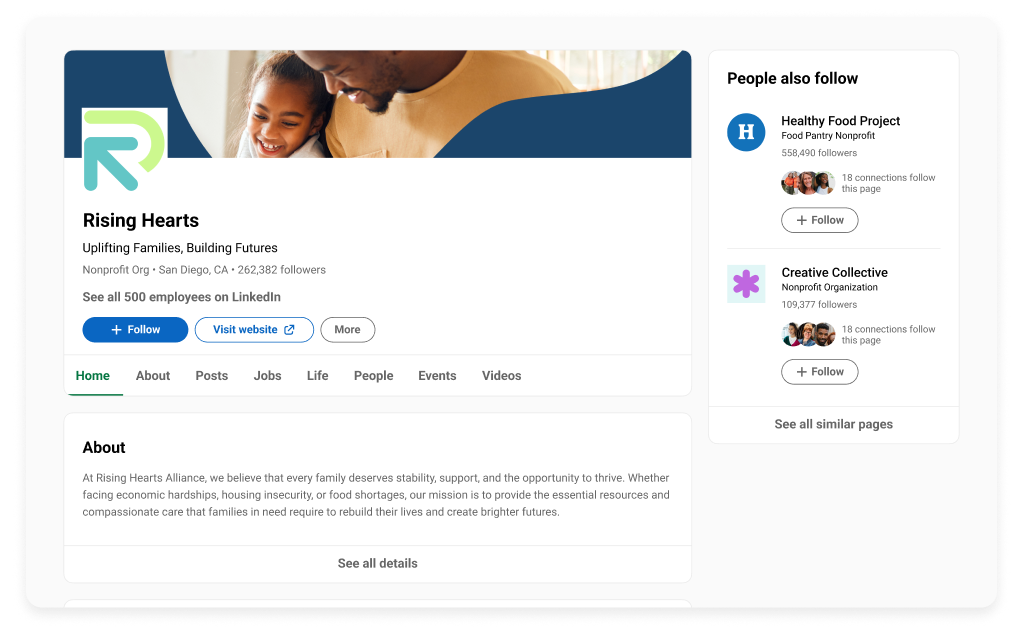
Establishing a LinkedIn presence starts with building an effective page. Here’s how your nonprofit organization can use its page to gain credibility and catch the attention of potential supporters.
Optimize your LinkedIn page basics
It all starts with making a good first impression.
Your page’s basic visual components should include:
- Company logo (400×400 pixels)
- Cover image (a visual banner across the top of the page, 4200×700 pixels)
- Tagline (a few words, usually appearing within the cover image)
- Brief mission statement (appears under your company name)
As with all branding components, it’s critical to stay true to your organization’s color scheme, fonts, voice, and tone.
Write a compelling About section
The next thing an interested LinkedIn user is likely to do if they want to learn more about your organization is click on the About section of your page. This should be a few brief paragraphs summarizing your organization’s mission, purpose, and core values. Explain who your organization serves, what problem it solves, and why it matters.
Remember to also include a way for people to contact you in your About section. Where relevant, mention data on the impact you’ve made and use emotionally compelling language to build trust with potential supporters. Lastly, include relevant SEO keywords, as these are essential for discoverability on LinkedIn and external search engines, like Google.
Complete all key page details
LinkedIn will prompt you to add details, including your website URL, company size, industry, year founded, and specialties. The more details you provide, the easier it will be to get discovered by potential supporters and gain visitors’ trust.
2. Engage your network to build a following
Once you’ve completed your page, it’s time to start promoting it to generate some activity.
Activate your team and board
Start with your employees, leadership team, and board members, as they’re already familiar with your mission and can share your organization’s initial posts with their networks. Ensure you notify your core supporters any time you post so they can reshare or send a roundup of posts for them to engage with at the end of the week. Make sure they follow your page as well, so it gains some traction immediately.
Build meaningful connections
Actively engage with your nonprofit’s network by liking and commenting on relevant posts and joining discussions. This helps to create visibility for your page, gain authority, and interact with partners.
Pay particular attention to content created by your donors, partners, and industry professionals aligned with your organization. Once you’ve caught their attention and established an online rapport, they’re more likely to notice and engage with your content as well. This dynamic is key to getting more eyeballs on your posts from the right targets and building these crucial connections naturally.
You can also reach out to your strongest contacts to encourage them to leave a comment and share your posts with their networks, highlighting their involvement with your organization. LinkedIn even offers a way to send posts directly to certain contacts via LinkedIn messaging. This is a great way to cultivate like-minded connections.
3. Expand your reach and visibility
Now that you’ve created your page and seeded it with activity from your core supporters, it’s time to cultivate an external audience.
Use LinkedIn features strategically
LinkedIn has a number of built-in features to extend your reach beyond immediate followers.
These include:
- Hashtags: Hashtags are words or phrases preceded by the # symbol that categorize your content with other information on the same topic. Using hashtags in your content will help users find your posts when they’re searching for related information on LinkedIn. For example, #GivingTuesday or #sustainability.
- Tagging: Tagging allows you to mention a person or company in your posts by using the @ symbol before the name. When you start typing the name, a dropdown menu will appear, and you can choose the person or company you want to tag. That person or company will receive a notification when you publish.
- Employee advocacy: Employee advocacy encourages your employees, who also have networks of like-minded people, to use relevant hashtags and tag your company when they interact on LinkedIn. This will help to organically spread awareness of your company to potential supporters.
Collaborate with corporate partners
Reach out to any partners you’ve worked with in the past—event sponsors or speakers, corporate donors, or association connections. Ask them if they’d like to co-create content that you both can post on your LinkedIn pages to reach new audiences. Cobranded content benefits both parties through increased visibility, credibility, brand alignment, and heightened impact.
Leverage events and campaigns
Whenever your organization runs a campaign or hosts an event, LinkedIn can help spread the word. Start posting about your event or campaign at least one month in advance to generate excitement, then post every day during the campaign or several times on event day. Once it wraps, share and celebrate your results with your network, which naturally plants a seed of interest for supporters to participate next time.
Interested in building better campaigns? See what other nonprofits are creating with GoFundMe Pro.
4. Elevate your content strategy
With over 310 million people actively using LinkedIn every month, it’s crucial to update your content regularly to ensure it’s fresh and always working to attract new audiences and retain existing connections.
Here are some ways to build on the momentum you’ve created:
Share impact-driven stories
Mine for success stories continually by following up with recipients of your fundraising dollars. Ask if they would mind sharing their story for use on your website and social channels. Use pictures, quotes, testimonials, and visuals, including video, to forge an emotional connection.
Post consistently and strategically
Sources suggest posting at least 2 to 3 times per week to maintain consistency, build trust, and keep your organization top of mind. However, pages that post daily get twice the engagement, so don’t feel you have to hold back.
Your posts should always be authentic and offer value to your readers. Include a content mix of educational, inspirational, and promotional posts as part of your strategy.
Here are some posting guidelines to keep in mind:
- Create a monthly nonprofit content calendar to ensure variety in your content and consistency in your outputs.
- Take advantage of peak engagement hours, 3–8 PM, Monday through Friday.
- Stick to 150 characters or less.
- Include a custom image or video when applicable.
- Incorporate 3 to 5 relevant hashtags.
Optimize for engagement
Every post should provide value for the reader and encourage further interaction with your page, or with the organization itself.
According to Sprout Social, there are four things the LinkedIn algorithm rewards when deciding what content to push to users:
- Post quality: Compliance with spam guidelines and LinkedIn’s professional community policies is crucial.
- Post testing: The better your post performs by generating engagement in initial tests performed by the algorithm, the more distribution it will get.
- Member activity: Attracting members who care about your subject matter is essential.
- Relevancy: Content should relate to your first-degree connections in terms of topic, language, mentioned people, or companies.
Now, here are some tips to get noticed by LinkedIn’s algorithm:
- Include a clear call to action (CTA) for more information, which will most likely be a link back to your website.
- Ask a question and encourage users to leave an answer in the comments.
- Include polls directly within your post.
- Upload a video within your post by clicking on the Video button under the text box. You can also post a YouTube video by copying the URL from YouTube directly into the message box.
5. Raise money for your mission
Yes, posting to your LinkedIn page is great for attracting new supporters and keeping your audience engaged, but it’s also a good way to ask for donations. The key is to balance your ask with significant value.
Turn engagement into donations
Asking for donations on LinkedIn should stem naturally from the conversation you’ve started in your posts. If you’ve attracted attention and created an emotional response, you can plug a link to your nonprofit donation page.
Target the right donors
As a platform specifically created for connections, LinkedIn is an ideal tool to identify and reach out to corporate partners, sponsors, and high-impact individuals. Build relationships with targeted individuals by sending an invitation to follow your page. Once they’ve accepted, they’ll become part of your audience and get exposure to your initiatives.
Pro tip: LinkedIn Ads is an effective way to target specific job titles, company sizes, and industries for event invitations, sponsorships, partnerships, board cultivation, talent acquisition, and donation requests.
Track and optimize performance
Once your page and networking are in full swing, evaluate your posts’ performance to see what worked—and what didn’t.
- Research industry benchmarks for metrics like engagement and click-through rate to see how yours compare.
- Use LinkedIn Analytics to monitor the activity on your page over time.
- Explore the Similar Pages feature for inspiration from other organizations in your field. Go to your Company Page Admin View > Analytics > Competitors. You can add specific organizations to learn about their follower growth, posts, and engagement, and model their success.
Remember, it’s not about generating likes for quantity. It’s about attracting the right type of people that you can convert to supporters, advocates, and donors.
FAQs
What’s the difference between a LinkedIn personal profile, company page, and organization page?
A personal LinkedIn page, known as a profile, represents an individual’s career progression and professional interests, with the goal of growing professional networks and job opportunities. A company’s LinkedIn page represents the business as a whole, with the goal of creating awareness, building its brand, and attracting top talent. Your organization’s page is a form of company pages focused on sharing your nonprofit mission and attracting volunteers and donors.
What type of content performs best on LinkedIn for nonprofits?
LinkedIn advises that for every five pieces of content you post, aim for:
- Two pieces of informational content about your nonprofit’s mission, programs, and work
- Two powerful or uplifting stories to showcase your impact
- One CTA
Experiment to see which content types and formats drive the most traction for your organization, then apply those learnings to future content.
Does LinkedIn offer a discount on advertising for nonprofits?
LinkedIn doesn’t currently offer discounts on its marketing products, as these solutions are cost-per-click. However, your organization may be eligible to receive free dedicated support from LinkedIn experts to help you make the most of your advertising campaigns.
Are there special LinkedIn features available for nonprofits?
LinkedIn has a number of features tailored to the needs of nonprofits, many discounted up to 50%. For example, Sales Navigator is a tool to help you identify, engage, and nurture major donors, corporate sponsors, and volunteers.
Copy editor: Ayanna Julien
Posted in Fundraising Marketing
Subscribe to the GoFundMe Pro blog
Get the latest fundraising tips, trends, and ideas in your inbox.
Thank you for subscribing
You signed up for emails from GoFundMe Pro



Request a demo
Learn how top nonprofits use GoFundMe Pro to power their fundraising.